Configuration
Complete guide to configuring Gopher for optimal performance.
Settings Overview
Gopher settings are organized into four sections:
| Section | Contents |
|---|---|
| General | Data source, API keys, authentication |
| Models | LLM model selection |
| Trading | Asset, timeframes, strategy preferences |
| Advanced | Iteration limits, context settings |
General Settings
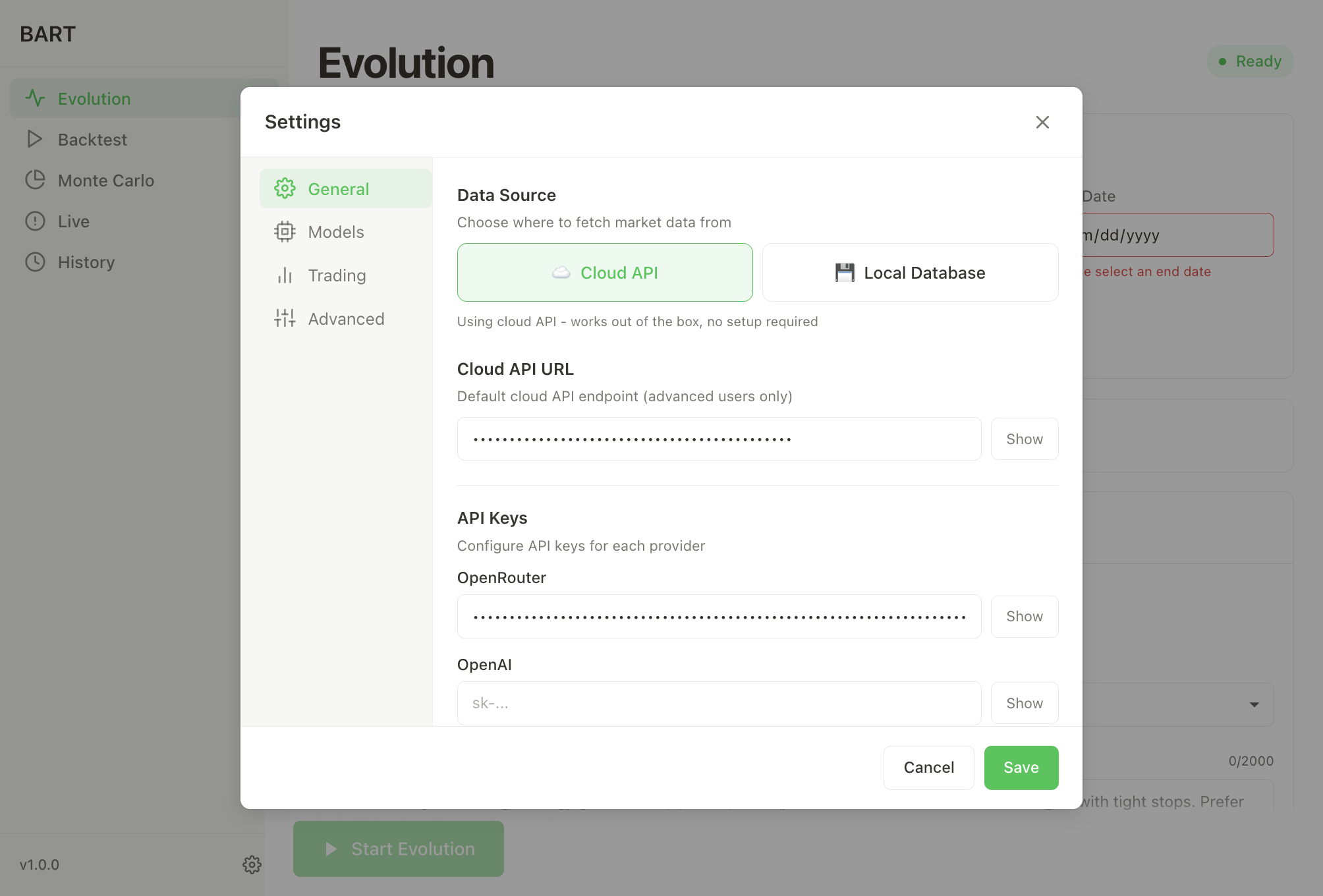
Data Source
| Option | Description |
|---|---|
| Cloud API | Uses hosted data service. No setup required. (Default) |
| Local Database | Connect to your own PostgreSQL instance. |
The cloud API is recommended for most users - it provides access to historical data for 200+ assets without any setup.
Authentication
Gopher supports multiple ways to access LLM inference. Configure at least one:
Gopher Credits (Recommended)
The easiest way to get started - use Gopher's hosted inference service:
- Go to gotrader.gopher-ai.com/settings
- Create an account or sign in
- Purchase credits (or use existing balance)
- Copy your Gopher Key (format:
gopher_xxx...) - Paste in the Gopher Key field in Settings
- Click Test to verify
Benefits of Gopher Credits:
- No external API keys needed
- Optimized models pre-configured
- Pay-as-you-go pricing
- Single account for everything
OpenRouter
Bring your own OpenRouter API key:
- Get a key at openrouter.ai/keys
- Paste in the OpenRouter API Key field
- Click Test to verify
OpenRouter provides access to 100+ models with a single API key.
OpenAI
Use OpenAI directly:
- Get a key at platform.openai.com/api-keys
- Paste in the OpenAI API Key field
- Click Test to verify
Inference
Gopher resolves inference settings per loop, which means the main evolution loop, tools, backtests, Monte Carlo validation, and compression can each use different providers or models when needed.
Inference providers:
- Gopher Credits
- OpenRouter
- OpenAI
- Ollama (local)
- Basilica (OpenAI-compatible)
- Custom (OpenAI-compatible)
Per-loop overrides: You can set overrides per loop (provider, model ID, base URL, API key) in the desktop app: Settings → Advanced → Inference Overrides.
Base URL conventions:
- Use the OpenAI-compatible root URL only (no
/chat/completions). - When using Gopher Credits, the base URL is normalized to
.../api/v1/gopher.
Environment variables:
BART_GOPHER_CODEBART_GOPHER_API_URLOPENROUTER_API_KEYOPENAI_API_KEY
Basilica (OpenAI-compatible)
Basilica deployments expose an OpenAI-compatible API. See:
Setup steps:
- Deploy a model with Basilica (vLLM or SGLang) and copy the deployment URL.
- Configure Gopher with:
- Base URL:
${DEPLOYMENT_URL}/v1 - API Key:
not-needed(Basilica handles auth for the deployment URL)
- Base URL:
- Example model IDs (Hugging Face IDs):
Qwen/Qwen2.5-7B-Instructmeta-llama/Llama-3.1-8B-Instructmistralai/Mistral-7B-Instruct-v0.3deepseek-ai/DeepSeek-V2-Chat
Model Settings
Loop Model
The primary model for strategy generation and evolution.
Recommended models:
| Model | Provider | Notes |
|---|---|---|
qwen/qwen3-max | OpenRouter | Best quality, recommended |
anthropic/claude-3.5-sonnet | OpenRouter | Fast and capable |
openai/gpt-4-turbo | OpenRouter/OpenAI | Reliable fallback |
Backtest Model
A faster model used for trade decisions during backtests.
Recommended models:
| Model | Provider | Notes |
|---|---|---|
qwen/qwen3-vl-8b-instruct | OpenRouter | Fast and efficient |
openai/gpt-4o-mini | OpenRouter/OpenAI | Good balance |
Adding Custom Models
Click + Add Custom to add models not in the default list:
| Field | Description |
|---|---|
| Model ID | The model identifier (e.g., deepseek-v3) |
| Display Name | Friendly name shown in dropdowns |
| Provider | OpenRouter, OpenAI, Ollama, or Custom |
| Base URL | API endpoint (auto-filled for known providers) |
| API Key | Key for this specific model (if required) |
Trading Settings
Default Asset
Pre-selected asset for new evolutions. Popular choices:
- BTC - Bitcoin, most data coverage
- ETH - Ethereum
- SOL - Solana
Minimum Coverage (%)
Minimum data coverage required to run a backtest. Default: 65%.
Higher values ensure more reliable backtests but limit date range options.
Timeframe Intervals
Select intervals for multi-timeframe analysis:
| Interval | Use Case |
|---|---|
| 1m, 5m | Scalping |
| 15m, 30m | Day trading |
| 1h, 4h, 8h | Swing trading |
| 1d, 1w | Position trading |
Tip: Use multiple timeframes together (e.g., 15m + 1h + 4h) for better results.
Indicators
Indicators control how the AI summarizes market conditions across timeframes.
- Configure indicators per run in Backtest, Evolution, or Monte Carlo
- Saved presets include the indicator set
- If no indicators are selected, defaults are used
See the dedicated guide for examples and full configuration:
Default Strategy Prompt
Optional starting prompt for evolution. Examples:
"Focus on trend-following strategies with clear entry/exit rules""Use mean reversion with Bollinger Bands"- Leave empty for fully autonomous discovery
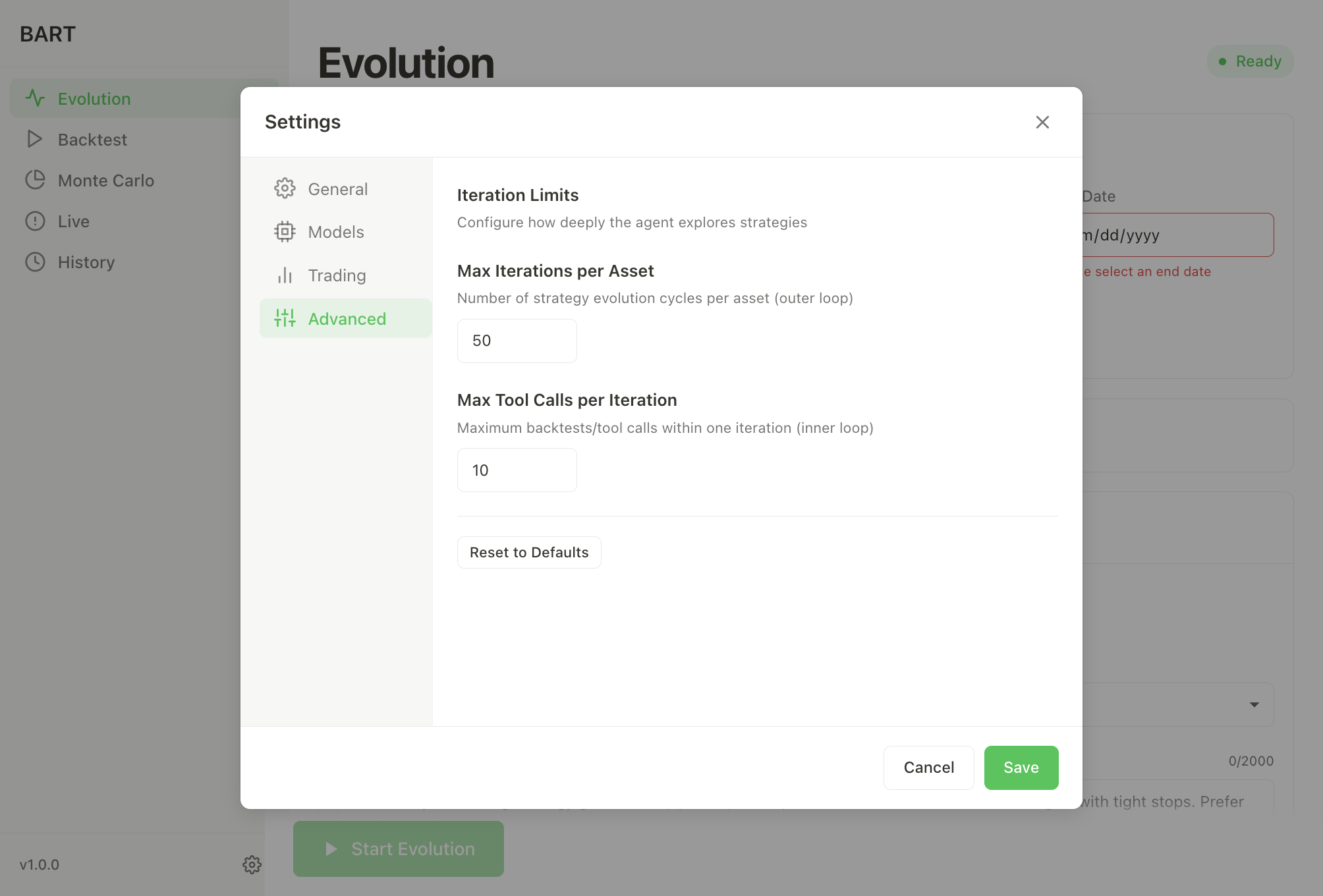
Advanced Settings
Max Iterations per Asset
Number of strategy evolution cycles. Default: 50.
| Value | Trade-off |
|---|---|
| 10-25 | Quick exploration, lower API costs |
| 50 | Balanced (recommended) |
| 100+ | Thorough exploration, higher API costs |
Max Tool Calls per Iteration
Maximum backtests within one iteration. Default: 10.
Higher values allow the AI to explore more variations per iteration but increase API costs.
Evaluation Interval
How often to evaluate positions during backtests. Default: 15m.
Shorter intervals = more decisions = higher costs but finer granularity.
Monte Carlo Runs
Number of Monte Carlo simulations for validation. Default: 100.
Risk Settings
Configure risk parameters in the Evolution panel:
| Setting | Default | Description |
|---|---|---|
| Risk % | 2% | Percentage of equity risked per trade |
| Stop % | 0.5% | Minimum stop-loss distance |
| Target R:R | 2:1 | Target reward-to-risk ratio |
| Min R:R | 1:1 | Minimum R:R enforced |
| Max Margin | 25% | Maximum margin utilization |
| Leverage | 10x | Position leverage |
| Initial Balance | $10,000 | Starting capital for backtests |
Environment Variables
For CLI users or advanced configuration:
| Variable | Description |
|---|---|
BART_GOPHER_CODE | Gopher Key for hosted inference (recommended) |
OPENROUTER_API_KEY | OpenRouter API key |
OPENAI_API_KEY | OpenAI API key |
DATABASE_URL | Local database connection string |
Example setup:
# ~/.bashrc or ~/.zshrc

# Option 1: Gopher Credits (recommended)
export BART_GOPHER_CODE='gopher_your-key-here'

# Option 2: OpenRouter
export OPENROUTER_API_KEY='sk-or-v1-your-key-here'
Get your Gopher Key at gotrader.gopher-ai.com/settings.
Presets
Save and load configuration presets for different strategies:
Saving a Preset
- Configure your desired settings
- Go to Evolution tab
- Click Save Preset
- Enter a name (e.g., "BTC Swing Trading")
Loading a Preset
- Open the preset dropdown in the Evolution tab
- Select your saved preset
- All settings are restored
Built-in Presets
Gopher includes several default presets:
| Preset | Description |
|---|---|
| Quick Test | Fast iteration for testing (10 iterations) |
| Standard | Balanced settings (50 iterations) |
| Thorough | Deep exploration (100 iterations) |
| Scalping | Short timeframes (1m, 5m) |
| Swing | Medium timeframes (1h, 4h, 8h) |
| Position | Long timeframes (1d, 1w) |
Configuration File Location
Settings are stored locally:
| Platform | Location |
|---|---|
| macOS | ~/Documents/Gopher/config.json |
| Windows | %USERPROFILE%\Documents\Gopher\config.json |
| Linux | ~/Documents/Gopher/config.json |
Next Steps
- Strategy Evolution - Learn how evolution works
- Data Coverage - Available assets and timeframes
- Supported Models - Full list of LLM options