Supported Models
Gopher supports multiple LLM providers and models for strategy generation and backtesting.
Providers
| Provider | Description | API Key Required |
|---|---|---|
| Gopher Credits | Hosted inference, easiest setup | Yes (Gopher Key) |
| OpenRouter | Access 100+ models with one key | Yes |
| OpenAI | GPT-4, GPT-4o models | Yes |
| Ollama | Local models | No |
| Basilica | OpenAI-compatible deployments | No (deployment URL) |
| Custom | Any OpenAI-compatible API | Varies |
Gopher Credits (Recommended)
The easiest way to use Gopher - no external API accounts needed.
Setup
- Go to gotrader.gopher-ai.com/settings
- Create an account or sign in
- Purchase credits
- Copy your Gopher Key (format:
gopher_xxx...) - Enter in Gopher Settings or set as environment variable:
export BART_GOPHER_CODE='gopher_your-key-here'
Benefits
- No external accounts: Single account for everything
- Optimized models: Pre-configured for best results
- Pay-as-you-go: Only pay for what you use
- Simple setup: Just one key to configure
When using Gopher Credits, model selection is handled automatically with optimized defaults.
Recommended Models
For Strategy Generation (Loop Model)
These models are best for the main evolution loop - generating and refining strategies.
| Model | Provider | Quality | Speed | Cost |
|---|---|---|---|---|
qwen/qwen3-max | OpenRouter | Excellent | Medium | $$ |
anthropic/claude-3.5-sonnet | OpenRouter | Excellent | Fast | $$$ |
openai/gpt-4-turbo | OpenRouter/OpenAI | Excellent | Medium | $$$ |
deepseek/deepseek-chat | OpenRouter | Very Good | Fast | $ |
meta-llama/llama-3.1-70b-instruct | OpenRouter | Good | Medium | $ |
Recommendation: qwen/qwen3-max offers the best balance of quality and cost.
For Backtesting (Backtest Model)
These models make trade decisions during backtests. Speed and efficiency matter here.
| Model | Provider | Quality | Speed | Cost |
|---|---|---|---|---|
qwen/qwen3-vl-8b-instruct | OpenRouter | Good | Very Fast | $ |
openai/gpt-4o-mini | OpenRouter/OpenAI | Good | Fast | $ |
meta-llama/llama-3.1-8b-instruct | OpenRouter | Good | Very Fast | $ |
mistral/mistral-7b-instruct | OpenRouter | Good | Very Fast | $ |
Recommendation: qwen/qwen3-vl-8b-instruct is fast and cost-effective.
OpenRouter Models
OpenRouter provides access to models from multiple providers with a single API key.
Getting Started
- Create an account at openrouter.ai
- Generate an API key at openrouter.ai/keys
- Add credits to your account
- Enter the key in Gopher Settings
Popular OpenRouter Models
Premium Tier:
anthropic/claude-3.5-sonnet- Fast, excellent reasoninganthropic/claude-3-opus- Most capable Claude modelopenai/gpt-4-turbo- Latest GPT-4openai/gpt-4o- Optimized GPT-4
Mid Tier:
qwen/qwen3-max- Excellent quality/cost ratiodeepseek/deepseek-chat- Good for technical tasksmeta-llama/llama-3.1-70b-instruct- Strong open model
Budget Tier:
qwen/qwen3-vl-8b-instruct- Fast and efficientopenai/gpt-4o-mini- Affordable GPT-4 variantmeta-llama/llama-3.1-8b-instruct- Good performance/cost
OpenAI Models
Use OpenAI directly with an OpenAI API key.
Available Models
| Model ID | Description |
|---|---|
gpt-4-turbo | Latest GPT-4, 128k context |
gpt-4o | Optimized GPT-4, faster |
gpt-4o-mini | Smaller, more affordable |
gpt-4 | Original GPT-4 |
gpt-3.5-turbo | Fast, budget option |
Getting Started
- Create account at platform.openai.com
- Generate API key at platform.openai.com/api-keys
- Add credits to your account
- Enter the key in Gopher Settings
Local Models (Ollama)
Run models locally without API costs using Ollama.
Setup
- Install Ollama from ollama.ai
- Pull a model:
ollama pull llama3.1:8b - Start Ollama (usually runs automatically)
- In Gopher Settings, add a custom model:
- Model ID:
llama3.1:8b - Provider: Ollama
- Base URL:
http://localhost:11434/v1 - API Key: (leave empty)
- Model ID:
Recommended Local Models
| Model | Size | VRAM Required |
|---|---|---|
llama3.1:8b | 4.7 GB | 8 GB |
llama3.1:70b | 40 GB | 48 GB |
mistral:7b | 4.1 GB | 8 GB |
codellama:13b | 7.4 GB | 16 GB |
qwen2:7b | 4.4 GB | 8 GB |
Note: Local models may produce lower quality results than cloud models, especially for smaller sizes.
Custom Models
Add any OpenAI-compatible API endpoint.
Adding a Custom Model
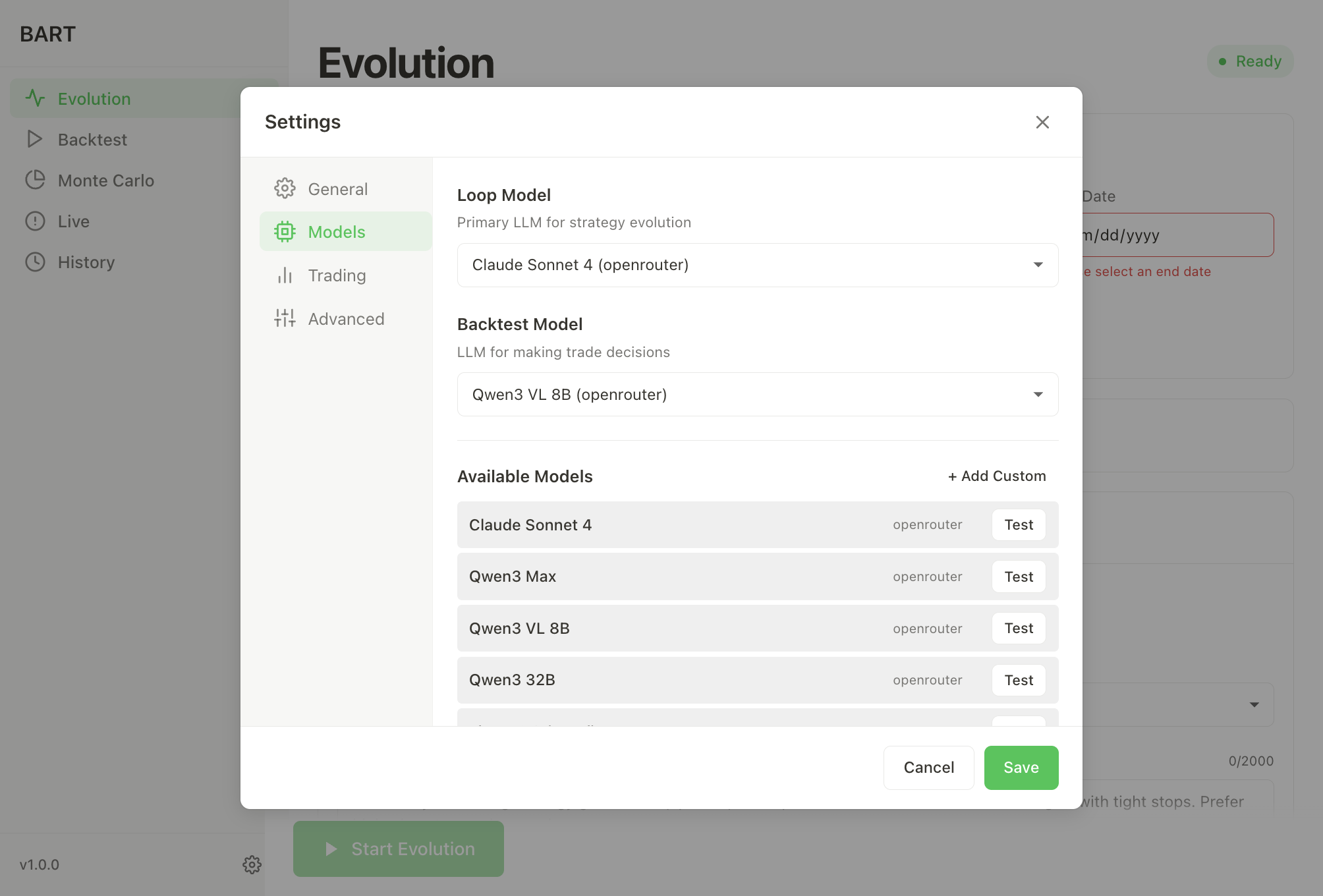
- Go to Settings > Models
- Click + Add Custom
- Fill in:
- Model ID: The model identifier
- Display Name: Friendly name
- Provider: Select "Custom"
- Base URL: OpenAI-compatible root URL only (e.g.,
https://api.example.com/v1) - API Key: Your key for this endpoint
Note: Do not include /chat/completions in the base URL. For per-loop overrides, see
Configuration → Inference.
Compatible Services
Many services offer OpenAI-compatible APIs:
- Together AI: together.ai
- Anyscale: anyscale.com
- Perplexity: perplexity.ai
- Groq: groq.com
- Basilica: docs.basilica.ai
- Local LLMs: LM Studio, vLLM, text-generation-webui
Model Selection Tips
Quality vs Cost
| Priority | Loop Model | Backtest Model |
|---|---|---|
| Best Quality | claude-3.5-sonnet | gpt-4o-mini |
| Balanced | qwen3-max | qwen3-vl-8b |
| Budget | deepseek-chat | llama-3.1-8b |
| Free (Local) | llama3.1:70b | llama3.1:8b |
Cost Optimization
- Use a capable model for the Loop (strategy generation)
- Use a fast/cheap model for Backtest (trade decisions)
- Reduce iterations if costs are too high
- Monitor usage in your provider dashboard
Testing Models
Click Test next to any model in Settings to verify:
- API key is valid
- Endpoint is reachable
- Model responds correctly
Fallback Model
Configure a fallback model in Settings for resilience:
- Used when primary model fails
- Should be a reliable, well-supported model
- Default:
anthropic/claude-sonnet-4.5
Next Steps
- Configuration - Set up models and API keys
- Quick Start - Run your first evolution
- Troubleshooting - API key issues